My Messages
Overview
This module provides users with a unified management and processing center for personal messages. It centrally displays all message records received by the currently logged-in user, supports filtering by type, content, and priority, and provides message statistics, batch operations (such as marking as read and deleting), and quick work order initiation, helping users efficiently track and process related notifications.
Page Details
-
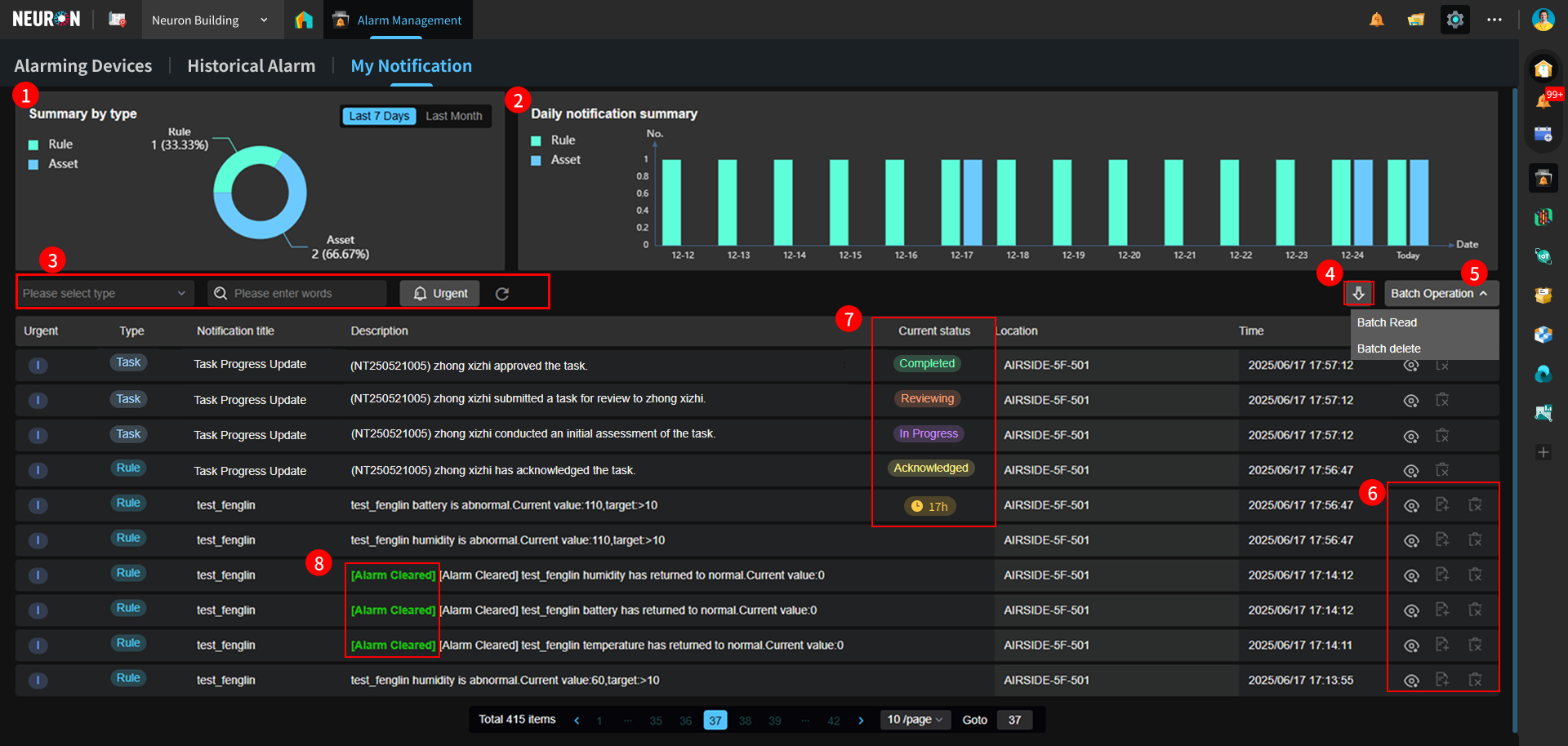
Summarizes the alarm information of the currently logged-in user by type.
-
Displays a stacked chart of different types of messages for the currently logged-in user in the last 15 days.
-
Supports fuzzy queries based on type and message content, and also supports filtering for highest-priority alarm messages. A Refresh button is provided to reset filter conditions and refresh the page.
-
Supports batch downloads by date.
-
More operations: Supports mark all as read and batch delete.
-
Function buttons: View Message, Create Work Order, Delete Message.
-
Current message status: Displays the current status of each message type. For example, "Rule" type messages show alarm duration; "Task" type messages show work order status.
-
Alarm cleared: When a device's status changes from alarming to normal, the system will push another message indicating the alarm has been cleared, with this label attached.